SarcGraph Tutorial
All demos are availble on GitHub at https://github.com/Sarc-Graph/sarcgraph/tree/main/tutorials.
To run demos with jupyter notebook check Installation Guide.
SarcGraph incorporates functions to automatically detect and track z-discs and sarcomeres in movies of beating human induced pluripotent stem cell-derived cardiomyocytes (hiPSC-CMs). In addition, SarcGraph includes the tools which enable the recovery of basic sarcomere characteristics and the ability to run further high level analysis.
In this notebook we provide a tutorial on how to use the SarcGraph package using demos and examples. The focus if on the SarcGraph class in the sarcgraph.sg module.
SarcGraph on a Sample Video
In this section we show how to use SarcGraph to detect and track z-discs and sarcomeres in a sample movie of beating hiPSC-CM.
To showcase this we use samples/sample_0.avi.
Import Modules
The first step is to import SarcGraph class from sarcgraph module:
Note: If you are accessing this tutorial through Binder, please uncomment and run this cell.
[ ]:
# !pip install -e ../.
[1]:
import numpy as np
import matplotlib.pyplot as plt
import pandas as pd

from sarcgraph import SarcGraph
SarcGraph Initialization
Next, we need to create an instance of the SarcGraph class.
```python sg.config.sigma = 2.0 sg._update_config(sigma=2.0)
[7]:
sg = SarcGraph()
output_dir = output
input_type = video
save_output = True
sigma = 1.0
zdisc_min_length = 10
zdisc_max_length = 100
full_track_ratio = 0.75
tp_depth = 4
skip_merge = False
num_neighbors = 3
avg_sarc_length = 15.0
min_sarc_length = 0.0
max_sarc_length = 30.0
coeff_avg_length = 1.0
coeff_neighbor_length = 1.0
coeff_neighbor_angle = 1.0
score_threshold = 0.1
angle_threshold = 1.2
[8]:
print("Original sigma:", sg.config.sigma)

sg.config.sigma = 2.0
print("Updated sigma (via direct assignment):", sg.config.sigma)

sg._update_config(sigma=3.0)
print("Updated sigma (via _update_config):", sg.config.sigma)
Original sigma: 1.0
Updated sigma (via direct assignment): 2.0
Updated sigma (via _update_config): 3.0
Run Detection
The simplest way to perform sarcomere detection on the video sample is to run SarcGraph().sarcomere_detection function:
[10]:
sarcomeres, _ = sg.sarcomere_detection(input_file='../samples/sample_0.avi', input_type='video', sigma=1.0)
Frame 79: 81 trajectories present.
Note: Any keyword argument passed to a function like sarcomere_detection (e.g., sigma=2.0) is internally forwarded to sg._update_config(…) before the function runs. This lets you override config values without manually changing sg.config.
SarcGraph().sarcomere_detection automatically runs in three steps:
Z-disc segmentation: load the video, filter frames, and detect z-discs
Z-disc tracking: track detected z-discs
Sarcomere detection: detect sarcomeres using tracked z-discs information
And, this is how the output looks like:
Note
sarcomeres.sample(5) randomly picks 5 samples to display, and running the cell multiple times should output different results.
[11]:
sarcomeres.sample(5)
[11]:
| frame | sarc_id | x | y | length | width | angle | zdiscs | |
|---|---|---|---|---|---|---|---|---|
| 3529 | 9 | 44 | 122.827395 | 93.097301 | 19.091258 | 13.243788 | 0.633543 | 43,63 |
| 1494 | 54 | 18 | 202.852530 | 100.594535 | 21.386733 | 13.067663 | 0.585633 | 11,15 |
| 3543 | 23 | 44 | 119.437507 | 88.133541 | 20.331353 | 14.011109 | 0.642878 | 43,63 |
| 2616 | 56 | 32 | 274.940081 | 221.315493 | 12.413677 | 14.261831 | 1.663814 | 27,31 |
| 2693 | 53 | 33 | 276.983419 | 165.536505 | 12.977938 | 12.943811 | 1.812994 | 28,32 |
By dafault save_output=True in sg.config and the following information will be saved in sg.config.output_dir:
raw video frames (grayscale)
filtered video frames
zdisc contours
segmented zdiscs information
tracked zdiscs information
detected sarcomeres information
Simple Visualization
We briefly show how to use the saved information to visualize z-discs and sarcomeres in one frame of the video.
[15]:
# load the information
output_dir = sg.config.output_dir
raw_frame = np.load(f"{output_dir}/raw_frames.npy")
tracked_zdiscs = pd.read_csv(f"{output_dir}/tracked_zdiscs.csv", index_col=[0])
[18]:
frame_num = 0
sarcs_frame = sarcomeres[sarcomeres.frame == frame_num]
zdiscs_frame = tracked_zdiscs[tracked_zdiscs.frame == frame_num]

plt.figure(figsize=(7,7))
plt.axes().set_title(f'Sarcomeres and Z-Discs in Frame {frame_num}')
plt.axis('off')
plt.imshow(raw_frame[frame_num], cmap='gray')
plt.plot(zdiscs_frame.y, zdiscs_frame.x, 'r.', label='Z-Discs')
plt.plot(sarcs_frame.y, sarcs_frame.x, 'b.', ms=10, label='Sarcomeres')
plt.legend()
[18]:
<matplotlib.legend.Legend at 0x722803f10910>

Alternative Way to Run SarcGraph
As mentioned in section Run Detection, sg.sarcomere_detection performs three tasks consecutively. Each task can also be run separately. Note that the results will not be saved since we have set save_output=False. We show how this can be done below:
Z-disc Segmentation
Run sg.zdisc_segmentation().
Input could be either
input_fileorraw_frames.
Notes
SarcGraph uses
scikitlibrary to load video/image files and can handle most formats. Yet, we recommend loading your sample video/image into a numpy array and pass the array as the input toSarcGraphfunctions, especially if the video/image is saved as aTIFFfile.
[ ]:
zdiscs = sg.zdisc_segmentation(input_file='../samples/sample_0.avi', save_output=False)

# load `raw_frames`
# zdiscs = sg.zdisc_segmentation(raw_frames=raw_frame)
Z-disc Tracking
Run sg.zdisc_tracking().
If the input is either
input_fileorraw_frames, this function runssg.zdisc_segmentationfirst and then applies tracking.If the input is
segmented_zdiscs,sg.zdisc_trackingonly runs tracking.
[21]:
tracked_zdiscs = sg.zdisc_tracking(segmented_zdiscs=zdiscs)
Frame 79: 81 trajectories present.
Let’s check the information stored in tracked_zdiscs:
[22]:
tracked_zdiscs.sample(10)
[22]:
| frame | x | y | p1_x | p1_y | p2_x | p2_y | particle | freq | |
|---|---|---|---|---|---|---|---|---|---|
| 1555 | 19 | 184.518660 | 266.525160 | 184.000000 | 260.667142 | 185.000000 | 272.718936 | 16 | 80 |
| 6429 | 79 | 184.506730 | 167.002881 | 182.000000 | 161.092676 | 187.000000 | 172.969227 | 39 | 80 |
| 2867 | 35 | 240.177834 | 150.183357 | 244.342161 | 146.000000 | 236.405462 | 155.000000 | 18 | 80 |
| 4018 | 49 | 111.995258 | 155.041922 | 108.000000 | 149.557462 | 115.000000 | 161.673055 | 42 | 80 |
| 4072 | 50 | 184.520292 | 277.996214 | 185.000000 | 270.838921 | 184.000000 | 285.085043 | 16 | 80 |
| 4251 | 52 | 270.681829 | 163.988891 | 273.000000 | 157.839894 | 269.000000 | 170.084687 | 32 | 80 |
| 3189 | 39 | 268.891087 | 263.511588 | 269.000000 | 256.284766 | 269.000000 | 270.835488 | 26 | 80 |
| 1480 | 18 | 184.714017 | 169.777278 | 182.000000 | 164.528144 | 187.000000 | 175.127891 | 39 | 80 |
| 2924 | 36 | 227.753694 | 148.106487 | 230.000000 | 142.209049 | 226.000000 | 153.472227 | 2 | 80 |
| 787 | 9 | 72.580198 | 100.578969 | 78.000000 | 96.474222 | 67.000000 | 104.803693 | 0 | 80 |
Sarcomere Detection Step
Run sg.sarcomere_detection().
If the input is either
input_fileorraw_frames, this function runssg.zdisc_segmentationthensg.zdisc_trackingbefore applying sarcomere detection.If the input is
segmented_zdiscs, this function runssg.zdisc_trackingfirst and then sarcomere detection.If the input is
tracked_zdiscs, this function only runs sarcomere detection.
[26]:
sarcs, _ = sg.sarcomere_detection(tracked_zdiscs=tracked_zdiscs)
SarcGraph on a Sample Image
To analyze a single frame, we can follow the same steps with a few modifications:
When working on single-frame images instead of videos, tracking cannot be performed. Therefore, during SarcGraph Initialization, we should set
input_type="image".If, instead of running
SarcGraph().sarcomere_detectionwithinput_fileorraw_frames, you want to process the image step-by-step, you should still runSarcGraph().zdiscs_trackingor passsegmented_zdiscsintosarcomere_detection, even though tracking won’t be applied on still image.
Import SarcGraph class first:
[27]:
from sarcgraph import SarcGraph
Create a new instance of SarcGraph class and set input_type='image'
[29]:
sg_img = SarcGraph(output_dir='../tutorial-results-image', input_type='image')
output_dir = ../tutorial-results-image
input_type = image
save_output = True
sigma = 1.0
zdisc_min_length = 10
zdisc_max_length = 100
full_track_ratio = 0.75
tp_depth = 4
skip_merge = False
num_neighbors = 3
avg_sarc_length = 15.0
min_sarc_length = 0.0
max_sarc_length = 30.0
coeff_avg_length = 1.0
coeff_neighbor_length = 1.0
coeff_neighbor_angle = 1.0
score_threshold = 0.1
angle_threshold = 1.2
Let’s load a sample image to a numpy array and pass it to sg_img.sarcomere_detection() rather than specifying input_file:
Note
We used matplotlib.image to load the image here.
[44]:
import matplotlib

img = matplotlib.image.imread('../samples/sample_5.png')
[45]:
plt.figure(figsize=(7,7))
plt.axes().set_title('Sample Image Visualized')
plt.axis('off')
plt.imshow(img, cmap='gray')
[45]:
<matplotlib.image.AxesImage at 0x7228020eb190>
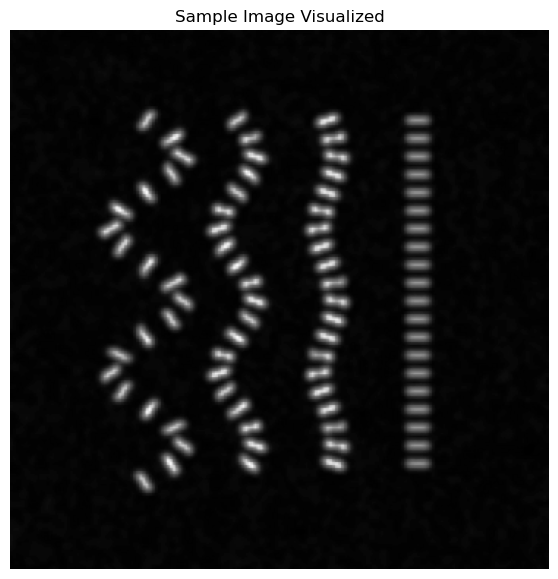
Now we can run sg_img.sarcomere_detection():
[46]:
# Image must be a stack of 2D images even if it is a single image.
img = img[None, :, :]
sarcs_img, _ = sg_img.sarcomere_detection(raw_frames=img)
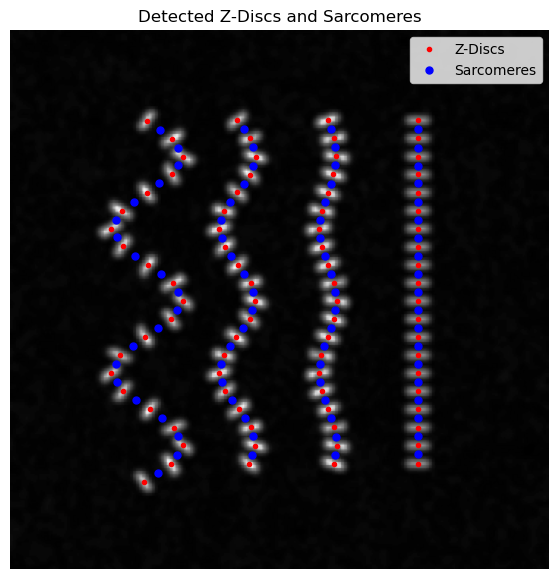
Similar to the video sample, we will visualize detected sarcomeres in this image:
[52]:
output_dir = sg_img.config.output_dir

segmented_zdiscs = pd.read_csv(f"{output_dir}/segmented_zdiscs.csv", index_col=[0])

plt.figure(figsize=(7,7))
plt.axes().set_title('Detected Z-Discs and Sarcomeres')
plt.axis('off')
plt.imshow(img[0], cmap='gray')
plt.plot(segmented_zdiscs.y, segmented_zdiscs.x, 'r.', label='Z-Discs')
plt.plot(sarcs_img.y, sarcs_img.x, 'b.', ms=10, label='Sarcomeres')
plt.legend()
[52]:
<matplotlib.legend.Legend at 0x72280a66ed40>
[ ]: